Prérequis
Docker Desktop installé et opérationnel
VSCode + extension Karavan installée
Ports disponibles :
8080(Karavan UI),1433(MS-SQL),5432(PostgreSQL)
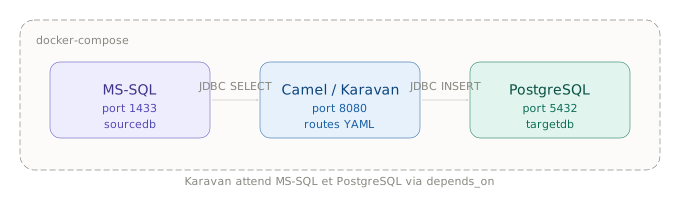
Architecture des conteneurs
Structure du projet
Créer le répertoire suivant sur le poste :
camel-mssql-pg/
├── docker-compose.yml
├── camel/
│   ├── application.properties
│   └── routes/
│       └── mssql-to-pg.camel.yaml
└── init/
    ├── mssql-init.sql
└── pg-init.sqldocker-compose.yml
version: '3.8'

services:

  mssql:
    image: mcr.microsoft.com/mssql/server:2022-latest
    container_name: camel-mssql
    environment:
      SA_PASSWORD: "Str0ngPass!"
      ACCEPT_EULA: "Y"
    ports:
      - "1433:1433"
    volumes:
      - ./init/mssql-init.sql:/init/mssql-init.sql

  postgres:
    image: postgres:16
    container_name: camel-postgres
    environment:
      POSTGRES_DB: targetdb
      POSTGRES_USER: camel
      POSTGRES_PASSWORD: camel
    ports:
      - "5432:5432"
    volumes:
      - ./init/pg-init.sql:/docker-entrypoint-initdb.d/pg-init.sql

  karavan:
    image: ghcr.io/apache/camel-karavan:4.8.0
    container_name: camel-karavan
    ports:
      - "8080:8080"
    volumes:
      - ./camel:/deployments/camel
    environment:
      KARAVAN_RUNTIME: camel-main
    depends_on:
      - mssql
      - postgres
Scripts d’initialisation
init/mssql-init.sql — table source
CREATE DATABASE sourcedb;
GO
USE sourcedb;
GO
CREATE TABLE produits (
    id   INT PRIMARY KEY IDENTITY,
    nom  NVARCHAR(100),
    prix DECIMAL(10,2),
    actif BIT DEFAULT 1
);
INSERT INTO produits (nom, prix) VALUES
    ('Article A', 10.50),
    ('Article B', 25.00),
    ('Article C', 7.99);
init/pg-init.sql — table cible
CREATE TABLE produits (
    id    INTEGER PRIMARY KEY,
    nom   TEXT,
    prix  NUMERIC(10,2),
    actif BOOLEAN DEFAULT TRUE
);
Configuration des datasources via VSCode
L’extension Karavan ne propose pas d’interface graphique pour les datasources — elles se déclarent dans camel/application.properties, édité directement dans VSCode.
Étape 1 — Ouvrir le dossier du projet dans VSCode
Fichier → Ouvrir le dossier… → sélectionner camel-mssql-pg/Étape 2 — Créer le fichier
Dans l’explorateur VSCode, faire un clic droit sur le dossier camel/ → Nouveau fichier → nommer application.properties.
Étape 3 — Saisir le contenu
# Datasource MS-SQL
camel.datasource.mssql.url=jdbc:sqlserver://mssql:1433;databaseName=sourcedb;encrypt=false
camel.datasource.mssql.driver-class-name=com.microsoft.sqlserver.jdbc.SQLServerDriver
camel.datasource.mssql.username=sa
camel.datasource.mssql.password=Str0ngPass!

# Datasource PostgreSQL
camel.datasource.postgres.url=jdbc:postgresql://postgres:5432/targetdb
camel.datasource.postgres.driver-class-name=org.postgresql.Driver
camel.datasource.postgres.username=camel
camel.datasource.postgres.password=camel

# Taille des lots
sync.batch.size=1000
Étape 4 — Sauvegarder
Ctrl+S (Windows/Linux) ou Cmd+S (macOS). Le fichier est immédiatement visible dans Karavan via l’onglet Files.
Lancement
# Démarrer les conteneurs
docker compose up -d

# Vérifier l'état
docker compose ps

# Arrêter
docker compose down
Ouvrir l’interface Karavan dans le navigateur :
| OS | Commande |
|---|---|
| macOS | open http://localhost:8080 |
| Linux | xdg-open http://localhost:8080 |
| Windows | start http://localhost:8080 |
Ou saisir directement http://localhost:8080 dans le navigateur.
Vérification MS-SQL
Linux / macOS (sqlcmd dans le conteneur)
docker exec -it camel-mssql /opt/mssql-tools18/bin/sqlcmd \
  -S localhost -U sa -P "Str0ngPass!" -No \
  -Q "SELECT * FROM sourcedb.dbo.produits"
Windows (PowerShell)
docker exec -it camel-mssql `
  /opt/mssql-tools18/bin/sqlcmd `
  -S localhost -U sa -P "Str0ngPass!" -No `
-Q "SELECT * FROM sourcedb.dbo.produits"Points d’attention
Le conteneur MS-SQL nécessite au moins 2 Go de RAM alloués à Docker
Le démarrage de MS-SQL prend ~30 secondes — Karavan attend via
depends_onLe mot de passe SA doit respecter la politique de complexité SQL Server (maj, min, chiffre, spécial)
Les drivers JDBC sont inclus dans l’image Karavan 4.8.0+ (
camel-mssql,camel-jdbc)